Thursday, 19 March 2015

PC Tips n Tricks #01

How To Increase And Boost Internet Speed - Step By Step Tutorial

Many peoples are searching for how to increase internet speed effective. I'll share few Pc tips n tricks which will boost your internet speed. Learn how to really increase internet speed.


There are many ways to improve internet speed but I'll focus on some important one's which have most effect on internet speed.

 Ways To Improve Internet Speed


         "Use Full Internet Bandwidth" 


In Windows 20% of Internet bandwidth is reserved which is used for windows updates and internal system. This is reserved for windows own use. You should disable this and get full internet bandwidth. Cut the windows part of bandwidth and you can boost net speed. There is no need to install any extra software to do this.

Step 1 

Follow the screenshot and Click on Start button and type gpedit.msc and press enter.


Step 2 

Now double click the Computer Configuration as per screenshot.


Step 3 

Now double click Administrative Templates.


Step 4 

Now Double Click Network.


Step 5 

Now Double Click QoS Packet Scheduler.


Step 6 

Now double click Limit reservable bandwidth.


Step 6 

First Click on Enabled. 
Then change Bandwidth Limit(%) to 0 (zero). As per screenshot. 
Then Click OK.
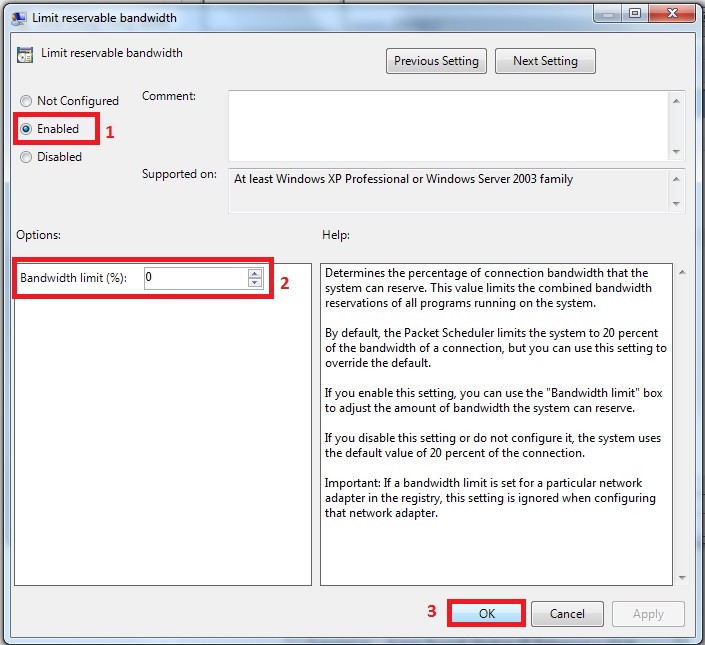

After click OK button you have now cut the part of windows bandwidth. There is no reserved bandwidth now. You will feel a difference that Internet speed is optimized now.

Use CCleaner

Sometimes your PC is full of browsing history, cache and cookies. You can download CCleaner free which is best software to remove the garbage from C Drive. CCleaner will ultimately have an effect on Internet speed.

Important Note:

Using the above methods will increase internet speed but still the final dependency is on your Internet connection bandwidth. So you should upgrade to a good connection bandwidth plan if you face huge issues even after trying above method. 

If you hit any issues while trying above methods to increase internet speed then please feel free to comment here. I’ll be more than happy to assist you.




Saturday, 14 March 2015

Pc Games Review #01

             Gta San Andreas Multiplayer (SA-MP)


San Andreas Multiplayer (abbreviated to SA:MP) is a third party multiplayer modification for the Grand Theft Auto: San Andreas computer game. San Andreas Multiplayer is developed by a team of dedicated fans of the Grand Theft Auto series of video games, who work on their own spare time developing SA:MP as a hobby.

History

SA:MP was created by kyeman and spookie in 2005, these were also the people who had created VC:MP, though SA:MP was considered superior by both the community and the developers due to the high amount of creativity and expansion that could be done in San Andreas rather than Vice City, for example ability to swim in water and a lot of other things which allowed the developers to create an engine which was more appealing that the older one.


Gamemodes

There are a wide range of gamemodes on SA:MP, these vary from the basic things such as deathmatches to things such as roleplay and cops and robber based gamemodes. Each SA:MP server has a specific gamemode in which the server is typically focused on, though there are servers which are classified as "Freeroam" which consist of many different activities that can be done.
Other mods are:
-Godfather mod
-RolePlay Game (clasic mod)
-Stunt/Parkour mode

PAWN


PAWN is the official language for scripting SA:MP servers, and is used by thousands of people to create their own server. The most commonly used program to script and compile PAWN is called pawno and is available from the official SA-MP website within the server download package. All PAWN functions and a basic scripting tutorial can be found at the official SA-MP wiki here

How to download SA-MP


Step 1: Downloads

Download link for Gta san andreas is given below the post
To Download The Client From the Official Site:
Click Here[www.sa-mp.com] (Mirrors available)
To Download Gta San Andreas Patch
Click Here[www.mediafire.com] (MediaFire)

Step 2: Gta San Andreas Patch
After Downloading the Patch Extract it To Your Desktop

Then Go to The Steam Folder and go to:
...SteamApps\common\Grand Theft Auto San Andreas

And Put the Two files in this Folder (Grand Theft Auto San Andreas)


Step 3: Installing The "MultiPlayer" Part

After you open the SAMP Installer You will see 
LICENSE AGREEMENT AND ATTRIBUTIONS
Tap I agree ;)

Then you will see the Screen to choose Install Direction
f you are on Windows 7 Just Go To The Grand Theft Auto San Andreas Folder 
And Copy The "Link" From The URL Bar
If You Are on Xp or on Any other System (not mac)
Just Tap On The Little Browse Button And Navigate To the San Andreas Folder

Step 4: Installation
If You Did All 3 Steps Good The Install Button Should appear
Then you just Wait About a Minute And its Done.

Step 5: ShortCuts
there are 2 Convenient ways with the shortcuts

Way 1:
After All The Installation Complete You going to The San Andreas Folder
and Makeing a shortcut to samp.exe
And Place it on your desktop


Way 2:

Open Steam Go to Library and then tap on 
+ ADD A GAME... 
Then on
ADD A NON-STEAM GAME...
Then you Just look for samp.exe 
or Browse and Add it to Your Library

How To Use samp Platform


Download Link for Gta San Andreas
Download Link : Click here
For this you'll need utorrent . You can download utorrent from : www.utorrent.com

Technology Review #02

Smart Bird

SmartBird is an autonomous ornithopter created by Festo's Bionic Learning Network with an emphasis on better aerodynamics and manoeuvrability. It is an ornithopter modeled on the herring gull. It has a mass of 450 grams and a wingspan of 1.96 meters. In April 2011 the SmartBird was unveiled at the Hanover Fair.
The natural wingbeat of a bird was emulated by using bionics technology to decipher bird flight. Based on the flight of a herring gull, Smartbird differs from previous flapping wing attempts in that it can take off, fly and land by itself. Its wings not only beat up and down, but deliberately twist. This is done by an active torsion mechanism, which provides both lift and propulsion.
Smartbird is constructed of polyurethane foam and carbon fiber and is powered by a 135 brushless motor running at 23 watts.

Lift and propulsion

Flight occurs in a manner very similar to that of real birds. The vertical motion of the wings is provided by an electric motor in the body of the bird. It is connected to two wheels that attach to rods in the wings in a manner similar to steam locomotives. Inside the wings are torsional servo motors that adjust the wings' angle of attack to provide forward motion. Directional control is provided by moving the tail.


Friday, 13 March 2015

Speed Up Internet Download Manager


Today I will show you how you can optimize your favorite Internet Download Manager, after optimizing your Internet Download Manager you will be able to download file in maximum download speed.

You will go crazy after watching the speed, follow all below steps to optimize your Internet Download Manager to increase your Download Speed. 

Step #01

Open Internet Download Manager, go to Downloads > options

Step #02

Click on Connection tab, you will able to see Max. Connections number, change it to 32 and apply the changes by clicking on OK button.

Now restart your Computer and check the Internet Download Manager Downloading speed, you will see the difference in downloading speed.

How to Increase Download Speed By IDM Optimizer 2015:

1.First of all you are required to download IDM Optimizer application. Download link is given at the bottom of this post.
2.Now open the download, unzip IDM Optimizer and run it. The below screen will be displayed – Click on Maximize Now.


3.If it works successfully then you will require to restart IDM. Below screen will be displayed. Restart your IDM and now you have done with this IDM Optimizer trick to increase download speed in IDM.
4.Check downloadsdownload speed in IDM will be increased by 20 to 25%.

Download IDM Optimizer


IMPORTANT: If you find any type of error in IDM or you faced IDM Crashing then..
  • Open IDM optimizer
  • Click on restore default option. (This option will reset the registry setting of IDM. Now restart your IDM and now it is as it was before)
My Experience:
This software (IDM Optimizer) is used by me and I have never faced any crashing problem. I have also noticed little increase in downloading speed in IDM. This application works best in multi-downloading. I got much increments in downloading when I download multiple file at a times. I can say my IDM download speed was increase by 20%.
Now it’s your turn to use this IDM Optimizer and increase download speed. If you find any difficulties or face any error, comment here.

Thursday, 12 March 2015

Clixsense Review

                               What is Clixsense ? 

Clixsense is a well established PTC ( Paid to Click ) company formed in 2007 . They pay you for a variety of online task and taking survey . They also have a number of other ways that you can make legitimate money online . These include
  • Visiting Websites 
  • Playing ClixGrid 
  • Paid Surveys 
  • Micro Tasks
  • Online Shopping
  • Contests 
  • Referring new members to ClixSense 

How to sign up for Clixsense ?

Signing up for Clixsense is too easy. You can sign up by following steps which are given below : 
 

 Step #01

  Go to the site by click this link below :

 Step #02

   Now sign up with your correct information in this box .

 Step #03

   After signing up all the box then click signup now button .


 Step #04

   For this you'll need a paypal or payza account . You can create on from here : www.payza.com

 Step #05

  Now Click the activation link sent to your email .


 Step #06

   
  After the activation you will be redirected to the site's log in page. (see image below)


 Step #07

 After Logging in, you will see your ACCOUNT SUMMARY on the top of the page. Explore the  site.


 Step #08

  Now you are ready to earn $$$ through clicking ads!( see image below)

 Step #09 

 After clicking the ads, a site on a new window will appear showing the captcha. Click the correct captcha and the timer will countdown.(see example below)

 Step #10 

 Click all the remaining ads! Until no ads isa available to click! Refresh your page and recheck your ACCOUNT SUMMARY.


And you are DONE!! CLICK EVERYDAY!! Do the same to all the PTC sites you are want to join! The more sites you joined, the more earnings!  You only need to be patience.!  

Wednesday, 11 March 2015

Technology Review #01

                       SAMSUNG GALAXY GRAND PRIME